Count Characters and Alphabets in Text Files - Free Response Practice Question (with solution)
| <-- Back to Lines and Words Count | Next to Analyzing Student Names --> |
Problem Statement
Write a Java program that reads text from a file, named day.txt and:
- counts and prints the number of characters in it (including spaces).
- counts and prints the number of characters in it (excluding spaces).
- counts and prints the number of alphabets in each line.
- counts and prints the number of uppercase and lowercase alphabets in each line.
Sample Input: day.txt
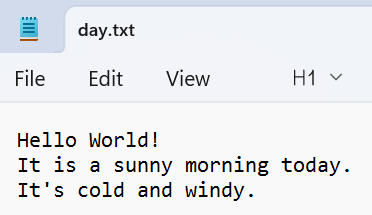
Sample Output (a): counts and prints the number of characters in it (including spaces).
View Output
Solution for (a): counts and prints the number of characters in it (including spaces).
View SolutionCountAllCharactersRunner.java
The program reads the file line by line using nextLine() and adds each line's length() to a running total. Because nextLine() strips the newline character but keeps spaces, this gives the total character count including spaces.
import java.io.File;
import java.io.IOException;
import java.util.Scanner;

public class CountAllCharactersRunner {

	public static void main(String args[]) {
		try {
			File inputFile = new File("day.txt");
			Scanner input = new Scanner(inputFile);
			int count = 0;

			while (input.hasNext()) {
				String line = input.nextLine();
				count = count + line.length();
			}
			System.out.println("Total Character count: " + count);
			input.close();

		} catch (IOException e) {
			System.out.println("File not found: " + e.getMessage());
		}

	}
}
Sample Output (b): counts and prints the number of characters in it (excluding spaces).
View Output
Solution for (b): counts and prints the number of characters in it (excluding spaces).
View SolutionCountNonSpaceCharRunner.java
Each line is split into individual single-character strings using split(""), and the counter increments only when a character is not equal to a space. This filters out spaces while counting all other characters.
import java.io.File;
import java.io.IOException;
import java.util.Scanner;

public class CountNonSpaceCharRunner {

	public static void main(String args[]) {
		try {
			File inputFile = new File("day.txt");
			Scanner input = new Scanner(inputFile);
			int count = 0;
			String[] characters = null;
			while (input.hasNext()) {
				String line = input.nextLine();
				characters = line.split("");
				for (int i = 0; i < characters.length; i++) {
					if (!characters[i].equals(" "))
						count++;
				}

			}
			System.out.println("Total Non-Space Character count: " + count);
			input.close();

		} catch (IOException e) {
			System.out.println("File not found: " + e.getMessage());
		}

	}
}
Sample Output (c): counts and prints the number of alphabets in each line.
View Output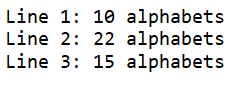
Solution for (c): counts and prints the number of alphabets in each line.
View SolutionCountAlphabetsPerLineRunner.java
The program loops through each character in a line using charAt() and checks it with Character.isLetter(), which returns true for both uppercase and lowercase letters but ignores digits, spaces, and punctuation. The alphabet count is printed after processing each line.
import java.io.File;
import java.io.FileNotFoundException;
import java.util.Scanner;

public class CountAlphabetsPerLineRunner {
	public static void main(String[] args) {

		try {
			File inputFile = new File("day.txt");
			Scanner input = new Scanner(inputFile);

			int lineNumber = 1;

			while (input.hasNextLine()) {
				String line = input.nextLine();
				int count = 0;
				for (int i = 0; i < line.length(); i++) {
					char ch = line.charAt(i);
					if (Character.isLetter(ch)) {
						count++;
					}
				}
				System.out.println(" Line " + lineNumber + ": " + count + " alphabets");
				lineNumber++;
			}
			input.close();
		} catch (FileNotFoundException e) {
			System.out.println("File not found.");
		}
	}
}
Sample Output (d): counts and prints the number of uppercase and lowercase alphabets in each line.
View Output
Solution for (d): counts and prints the number of uppercase and lowercase alphabets in each line.
View SolutionCountCasePerLineRunner.java
For each character that passes the Character.isLetter() check, the program further tests it with Character.isUpperCase() and Character.isLowerCase() to increment separate counters. Both the uppercase and lowercase totals are printed at the end of each line.
import java.io.File;
import java.io.FileNotFoundException;
import java.util.Scanner;

public class CountCasePerLineRunner {
	public static void main(String[] args) {

		try {
			File inputFile = new File("day.txt");
			Scanner input = new Scanner(inputFile);

			int lineNumber = 1;
			while (input.hasNextLine()) {
				String line = input.nextLine();

				int upper = 0;
				int lower = 0;

				for (int i = 0; i < line.length(); i++) {
					char ch = line.charAt(i);
					if (Character.isLetter(ch)) {
						if (Character.isUpperCase(ch)) {
							upper++;
						} else if (Character.isLowerCase(ch)) {
							lower++;
						}
					}
				}
				System.out.println("Line " + lineNumber + ": Uppercase = " + upper + ", Lowercase = " + lower);
				lineNumber++;
			}

			input.close();
		} catch (FileNotFoundException e) {
			System.out.println("File not found.");
		}
	}
}
Java project files (with input files):
- day.txt
- CountAllCharactersRunner.java
- CountNonSpaceCharRunner.java
- CountAlphabetsPerLineRunner.java
- CountCasePerLineRunner.java
| <-- Back to Lines and Words Count | Next to Analyzing Student Names --> |